Skip to content

Geeky Sweetie

The Best Anime RPG Games For Girls

  • Home
  • Top 10
    • The Best Games for Girls
    • The Best Anime for Girls
    • Top 10 Subscription Boxes for Geek Girls
    • The Best Disney Films For Girls
  • Reviews
    • Game Review
    • Anime Review
    • Manga Reviews
    • Kdrama Review
    • Subscription Box Review
    • Boardgame Review
    • Kawaii Review
    • Toy Review
    • Tech Review
    • Book Reviews
  • News
    • Game News
    • Anime News
    • Manga News
    • Kdrama News
    • Boardgame News
    • Kawaii News
    • Movie News
    • Music News
    • Tech News
    • Book News
  • About Us
    • About Geeky Sweetie
    • The Sweetest Geek
    • Contact Me
    • Understanding Our Scoring System
    • Review VS. Preview
    • Privacy Policy
    • Link to us!
    • Advertise With Us
  • Media Kit
  • Toggle search form

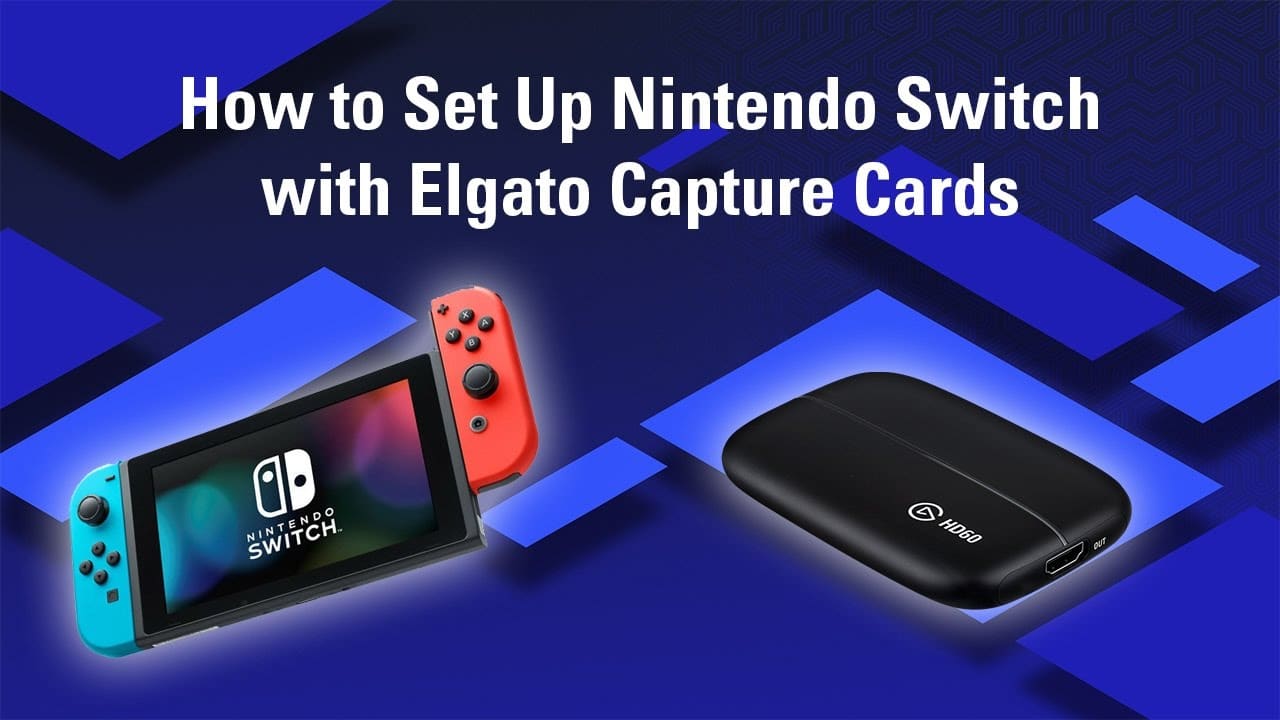
Ultimate Guide: Play Japanese Nintendo Switch Games in English with Elgato HD60 X and DeskTranslate.

Posted on November 13, 2023November 13, 2023 By GeekySweetie

Live OCR Translation Setup for Nintendo Switch Games (Desktop and Laptop)

Required Equipment:

  • Nintendo Switch and Dock
  • Elgato HD60 X capture card (Available on Amazon and Best Buy)
  • Desktop or Laptop with USB 3.0 port
  • Two HDMI cables (one comes with HD60 X)
  • OBS Studio (Download from OBS Project)
  • DeskTranslate (Download from DeskTranslate’s website)

Setup Steps:

  1. Hardware Connections:
  • Connect the Nintendo Switch Dock’s HDMI output to the Elgato HD60 X’s HDMI input.
  • Link the Elgato HD60 X’s USB output to a USB 3.0 port on your desktop or laptop.
  1. Software Installation:
  • Install OBS Studio.
  • Install DeskTranslate.
  1. Configure OBS Studio:
  • Launch OBS Studio and add the HD60 X as a video source.
  • Adjust OBS settings as needed.
  1. Set Up DeskTranslate for OCR:
  • Open DeskTranslate.
  • Set it to capture from OBS or directly from the capture card.
  1. Nintendo Switch Settings:
  • Adjust the Switch’s TV settings for optimal output.
  1. Gameplay and Translation:
  • Play your game and enjoy live translation on your screen.

Notes for Laptop Users:

  • Use your laptop’s built-in screen for display.
  • Ensure your laptop can handle the processing requirements.

This setup allows you to play Nintendo Switch games with live-translated text on both desktop and laptop.

Related

Gaming, Guides and Walkthroughs, How To, Tech Tags:Elgato, Game, Games, Gaming, Guide, How To, Live Translation, Nintendo, Nintendo Switch, OCR, Otome, Play Japanese Games In English, Tech, Translation, Video Games, Visual Novel

Post navigation

Previous Post: Autism Representation in Superhero Media: A Diverse Spectrum
Next Post: The Top 10 Most Valuable NFL Teams in 2023

Related Posts

How to Remove Debris Under Screen Protector On Smart Phone How to Remove Debris Under Screen Protector On Smart Phone Cellphone
Pokecolo English Walkthrough Pokemini is Closing – Join Pokecolo – Guide for English Users Animals
Dealspotr, Dealspotr Review, Dealspotr Guide, How to Use Dealspotr, Is Dealspotr Legit, Does Dealspotr Work, How Long to Earn on Dealspotr, Has Anyone Used DealSpotr, How Long To Earn Giftcards on DealSpotr, Free, Free Stuff, Free Amazon, Free Amazon Giftcard, Free Amazon Gift Cards, Free Amazon Giftcards, Free Amazon Gift Card, Coupons, Deals, Discounts, Share Coupons, Share Deals, Share Discounts, Make Money, Work From Home, Extra Income, Passive Income, Earn Rewards, Amazon, Amazon Giftcard, Amazon Gift Card, Amazon Giftcards, Amazon Gift Cards, Earn Amazon Giftcards, Earn Amazon Gift Cards, Make Money From Junk Mail, Make Money From Spam, Get Rich, Get Rich Quick Get Rich From Your Junk Mail and Spam with DealSpotr Deals and Discounts
Dealspotr Product Deal or Sitewide Sale? Dealspotr Tutorial. How to Earn Your First Amazon Giftcard and Get Started Quickly and Easily With DealSpotr Deals and Discounts
Amazon, Online Shopping, Black Friday, Black Friday 2016, Black November, Black November 2016, Amazon Deals, Amazon Discounts, Amazon Deals Week, Amazon Prime, Amazon Prime Day, Amazon Black Friday, Amazon Cyber Monday, Gaming Deals, Electronics, PC Deals, PC Gaming, Console Gaming, Toys, Electronics, Boardgames, Dolls, Cardgames, PS4, Xbone, Nintendo, Sony, Xbox, Cute, Kawaii, Deals and Discounts, Amazon Deals and Discounts, Lego, Legos Countdown to Black Friday with New Deals Every Day on Amazon 3DS
Save big with dealspotr and earn cashback for sharing coupons online dealspotr Helps You Save and Earn Cashback on Holiday Shopping Deals and Discounts
  • Samsung Galaxy XR Headset Review
  • Spoiler Fan Theory: Who is the Real Butcher in M Night Shymalan’s Trap Movie?
  • Geeky Sweetie Gets Airplay on VRT Radio 1 in Belgium with “Even ChatGPT Said It – Must Be True”
  • Nintendo Switch 2 Reveal – Excited? Disappointed? A Little of Both.
  • Review: Sailor Moon Super Live – North America Tour (Pittsburgh, PA)
  • About Geeky Sweetie
  • Advertise With Us
  • Contact Me
  • Credits
  • Link to us!
  • Newsletter
  • Privacy Policy
  • Review VS. Preview
  • Social Stream
  • The Best Anime for Girls
  • The Best Games for Girls
  • The Sweetest Geek
  • Understanding Our Scoring System
  • Welcome to GeekySweetie.com

Android Anime Choices Matter Cute Dating Sim Decisions Matter Free Game Game game review Games games for girls Gaming JRPG Kawaii Mobile Game Multiple Endings Nintendo Nintendo Switch Otome PC PC Game PC Games Playstation Playstation 2 Playstation 4 PS2 PS4 Retro Retro Gamers Retro Games Retro Gaming Review Romance RPG Sim Simulation Slice of Life Sony Story Rich Technology Video Game Videogame Video Games Videogames Visual Novel

  • About Geeky Sweetie
  • Advertise With Us
  • Contact Me
  • Credits
  • Link to us!
  • Newsletter
  • Privacy Policy
  • Review VS. Preview
  • Social Stream
  • The Best Anime for Girls
  • The Best Games for Girls
  • The Sweetest Geek
  • Understanding Our Scoring System
  • Welcome to GeekySweetie.com

Copyright © 2025 Geeky Sweetie.

Powered by PressBook Masonry Dark