Skip to content

Geeky Sweetie

The Best Anime RPG Games For Girls

  • Home
  • Top 10
    • The Best Games for Girls
    • The Best Anime for Girls
    • Top 10 Subscription Boxes for Geek Girls
    • The Best Disney Films For Girls
  • Reviews
    • Game Review
    • Anime Review
    • Manga Reviews
    • Kdrama Review
    • Subscription Box Review
    • Boardgame Review
    • Kawaii Review
    • Toy Review
    • Tech Review
    • Book Reviews
  • News
    • Game News
    • Anime News
    • Manga News
    • Kdrama News
    • Boardgame News
    • Kawaii News
    • Movie News
    • Music News
    • Tech News
    • Book News
  • About Us
    • About Geeky Sweetie
    • The Sweetest Geek
    • Contact Me
    • Understanding Our Scoring System
    • Review VS. Preview
    • Privacy Policy
    • Link to us!
    • Advertise With Us
  • Media Kit
  • Toggle search form
How to Remove Debris Under Screen Protector On Smart Phone

How to Remove Debris Under Screen Protector On Smart Phone

Posted on November 17, 2015 By GeekySweetie

I read an article today on how to remove dust, dirt, hairs, fuzz, lint, etc from underneath your screen protector.

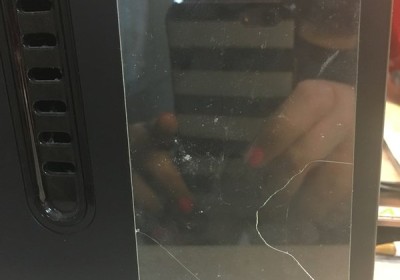
When I tried it though, my screen protector, which I’ve only had for 5 days, cracked.

I want to warn everyone that if you are googling how to remove debris under your screen protector to NOT follow this tutorial if you have a tempered glass screen protector. I have one from ZAGG that luckily will be covered under the warranty.

My poor screen protector:( pic.twitter.com/P9UZs2E3Aw

— Jenilee Dunson (@Xenokitten) November 17, 2015

For those wanting to remove dirt and debris… here’s the “urban legend” online…. ONCE AGAIN DO NOT TRY THIS WITH A GLASS SCREEN PROTECTOR. YOU CAN SEE ABOVE WHAT THIS DID TO MY BRAND NEW $45 ZAGG protector.

Materials needed: Scotch Tape

  1. Tear off two pieces of scotch tape

2.) Fold tape over on it’s self leaving enough space to slide your finger through each piece (so that both sides are sticky)

3.) With one piece of tape, take your finger at edge of screen protector and gently lift

4.) Use other tape-covered finger to dab the lint or debris until it is removed

5.) Gently lower the screen protector back down.

6.) (Added by me) DO NOT DO THIS IF YOU HAVE A GLASS SCREEN PROTECTOR – IT WILL CRACK!!!!!!

I don’t even know HOW the darn cat hair got under my screen protector. It was put on professionally at best buy. And up until this morning no hair. It was definitely UNDER the screen protector though. I small white hair from my short haired female cat. I also have her hairs on my brand new sweater that was stored in another room where my cats don’t have access. ARGH cat hairs… bane of my existence, but cats make life better, so worth it, even if they destroy sweaters and screen protectors LOL.

Luckily ZAGG gives all of their products a life time warranty; but now I must wait 3 – 7 business days with no screen protector, and go back to best buy and pay $5 to have them put it on for me 🙁 (or deal with the headache and cat hairs of putting it on for myself)

Related

Cellphone, How To, Technology Tags:Apple, Cellphone, Glass, HD, How To, How to Remove Dirt from Under Screen Protector, How to Remove Dirt under Screen Protector, How to Remove Hair From Under Screen Protector, How To Remove Lint Under Screen Protector, Invisishield, Iphone, Iphone 6, Iphone 6s, Protector, Remove Dirt, Remove Dust, Remove Hair, Remove Lint, Screen, Screen Protector, Smartphone, ZAGG

Post navigation

Previous Post: The Letter, a New Horror Visual Novel Kickstarter Campaign Half Way to Funding With 5 Days Left
Next Post: Disgaea comes to PC for the First Time with Disgaea PC – an HD Remake of the first game, Disgaea: Hour of Darkness

Related Posts

Devil Maker Tokyo Devil Maker Tokyo Review Android Phone
Nokia Lumia 1020 Camera Phone Preview Camera
Youtube Gaming Live Streaming Service VS Twitch Youtube to Begin Gaming Live Streaming Service to Compete with Twitch TV And You Can Sign Up For Early Access Game News
Why Iphone 6 Plus is the best Smartphone for Female Gamers Why Iphone 6 Plus is the best Smartphone for Female Gamers Android Phone
Nokia Lumia 1020 Camera Phone Review Nokia Lumia 1020 Camera Phone Review Cellphone
Apple TV's New Update to Put Huge Emphasis on Gaming Apple TV’s New Update to Put Huge Emphasis on Gaming Apple
  • Samsung Galaxy XR Headset Review
  • Spoiler Fan Theory: Who is the Real Butcher in M Night Shymalan’s Trap Movie?
  • Geeky Sweetie Gets Airplay on VRT Radio 1 in Belgium with “Even ChatGPT Said It – Must Be True”
  • Nintendo Switch 2 Reveal – Excited? Disappointed? A Little of Both.
  • Review: Sailor Moon Super Live – North America Tour (Pittsburgh, PA)
  • About Geeky Sweetie
  • Advertise With Us
  • Contact Me
  • Credits
  • Link to us!
  • Newsletter
  • Privacy Policy
  • Review VS. Preview
  • Social Stream
  • The Best Anime for Girls
  • The Best Games for Girls
  • The Sweetest Geek
  • Understanding Our Scoring System
  • Welcome to GeekySweetie.com

Android Anime Choices Matter Cute Dating Sim Decisions Matter Free Game Game game review Games games for girls Gaming JRPG Kawaii Mobile Game Multiple Endings Nintendo Nintendo Switch Otome PC PC Game PC Games Playstation Playstation 2 Playstation 4 PS2 PS4 Retro Retro Gamers Retro Games Retro Gaming Review Romance RPG Sim Simulation Slice of Life Sony Story Rich Technology Video Game Videogame Video Games Videogames Visual Novel

  • About Geeky Sweetie
  • Advertise With Us
  • Contact Me
  • Credits
  • Link to us!
  • Newsletter
  • Privacy Policy
  • Review VS. Preview
  • Social Stream
  • The Best Anime for Girls
  • The Best Games for Girls
  • The Sweetest Geek
  • Understanding Our Scoring System
  • Welcome to GeekySweetie.com

Copyright © 2025 Geeky Sweetie.

Powered by PressBook Masonry Dark